5 Practical Use Cases Where QA Engineers Can Use AI Agents
written by:

X min read
5.5.2026
AI agents are no longer experimental tools used only by developers. In day-to-day QA work, they can remove repetitive tasks, speed up investigation, and improve release confidence.
Most teams already automate tests in Playwright, Appium, or similar frameworks. The next step is using AI agents as force multipliers around those tests: accessibility, crash analysis, analytics quality, stability exploration, and API validation.
Here are five practical use cases that worked well in a real project setup, now with technical detail for engineering-oriented readers.
1. Accessibility Inspector Powered by AI (Mobile App)
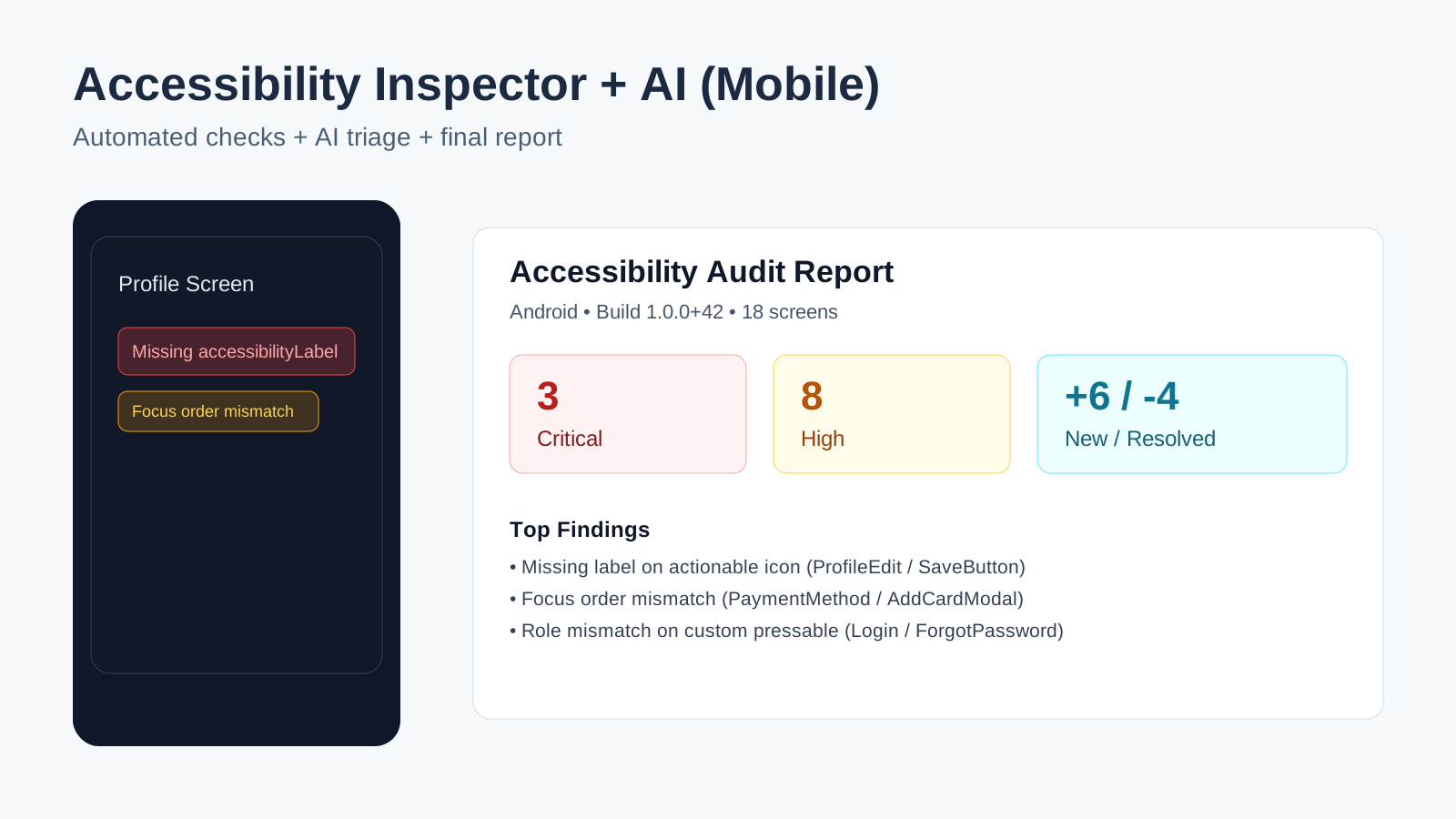
Accessibility is often postponed because it takes time and discipline. In our case, this workflow was implemented specifically for a mobile application. AI acted as a second layer on top of accessibility inspection output from mobile test runs.
What it does:
- finds missing labels and roles (accessibilityLabel, accessibilityRole),
- detects contrast and focus-order issues,
- suggests likely code-level fixes,
- helps generate post-audit checklists and reports.
Why it matters:
- less manual “click-through” auditing,
- faster accessibility regression detection,
- earlier fixes during development instead of late-stage cleanup.
Technical analysis:
- The pipeline combines deterministic rules with AI classification.
- Deterministic checks catch hard failures:
- element is clickable but has no accessibility label,
- role mismatch (button behavior without accessibilityRole="button"),
- duplicate accessibility identifiers in one screen tree.
- Contextual checks are delegated to AI:
- whether a label is semantically meaningful (not just present),
- whether focus order is logically aligned with user flow.
- Findings are normalized into a schema such as:
- screen, component_path, rule_id, severity, evidence, fix_hint.
- At the end of each run, a report was generated to summarize findings and make triage easier for QA and developers.
Example report (short format):
Accessibility Audit Report
Platform: Android
Build: 1.0.0 (42)
Date: 2026-03-06
Scope: 18 screens
Summary
- Total findings: 27
- Critical: 3
- High: 8
- Medium: 11
- Low: 5
- New vs previous run: +6
- Resolved since previous run: 4
Top Issues
1) [Critical] Missing accessibilityLabel on actionable icon
Screen: ProfileEdit
Component: Header/SaveButton/Icon
Rule: A11Y-MOBILE-LABEL-001
Evidence: Touchable element announced as "button" without name
Suggested fix: Add accessibilityLabel="Save profile"
2) [High] Focus order mismatch in modal
Screen: PaymentMethod
Component: AddCardModal
Rule: A11Y-MOBILE-FOCUS-003
Evidence: Screen reader jumps from field #1 to submit button
Suggested fix: Reorder accessible elements to match visual/input flow
3) [High] Role mismatch on custom pressable
Screen: Login
Component: Footer/ForgotPasswordLink
Rule: A11Y-MOBILE-ROLE-002
Evidence: Interactive element missing accessibilityRole
Suggested fix: Add accessibilityRole="button"
Regression Notes
- New critical issue introduced on ProfileEdit after build 41 -> 42
- Repeated high-severity issue on PaymentMethod (present in last 3 runs)
Ownership
- Mobile Team A: 12 findings
- Mobile Team B: 9 findings
- Shared Design System: 6 findings
2. Sentry + AI: From Error to Root Cause (High-Level)
Crash reports are useful, but they still require someone to translate “what happened” into “what to fix.” This is where AI provides real value.
At a high level, the workflow is simple:
- take a Sentry error event,
- let the agent read and summarize it,
- correlate it with likely code areas,
- return a probable root cause and suggested next step.
So instead of passing raw crash details between QA and devs, teams get an actionable investigation starting point. The result is faster triage, clearer bug reports, and less back-and-forth.
Technical analysis:
- Event processing usually follows this sequence:
- Resolve event -> issue metadata (release, environment, device family, frequency).
- Parse exception chain and prioritize in_app frames.
- Extract contextual signals from tags and breadcrumbs.
- Correlate frame filenames/functions to repository files.
- The agent then generates a structured triage artifact:
- likely root cause,
- candidate files and functions,
- reproduction hints,
- safe-fix direction and risk notes.
- If sourcemaps are incomplete, frame-to-source mapping confidence drops.
In that case, fallback ranking still helps by listing the most relevant frames first, but should be marked as lower confidence. - Operationally, this turns “stacktrace reading” into a repeatable triage protocol rather than ad-hoc debugging.
3. Analytics: “Master Excel” of Events Generated from Code
Analytics documentation becomes outdated quickly when features move fast. AI can build a reliable event inventory directly from the codebase.
What it does:
- scans tracking events in the app,
- maps events to screens and user actions,
- flags naming inconsistencies,
- generates a shared reference table for QA, product, and analytics.
Why it matters:
- one source of truth for analytics testing,
- fewer “is this expected?” discussions,
- faster validation of telemetry before release.
Technical analysis:
- The extraction step uses static analysis patterns:
- event constants,
- analytics provider wrappers,
- direct tracking calls with inline payloads.
- The agent resolves event metadata:
- event name,
- required/optional properties,
- value types,
- triggering context (screen load, CTA tap, submission success/failure).
- Drift detection compares events by key across call sites:
- same event name with incompatible property shapes,
- property naming divergence (user_id vs userId),
- orphan events (defined but never emitted).
- Output is serialized into a QA-friendly matrix (CSV/Excel), which can be used as a validation checklist in test runs and release sign-off.
- As a practical accelerator, we also used a sample from another project as a reference for the expected structure of this master Excel (columns, naming conventions, ownership fields, and validation status), so the generated sheet followed a proven format instead of being designed from scratch.
4. Smart Monkey: Context-Aware Monkey Testing
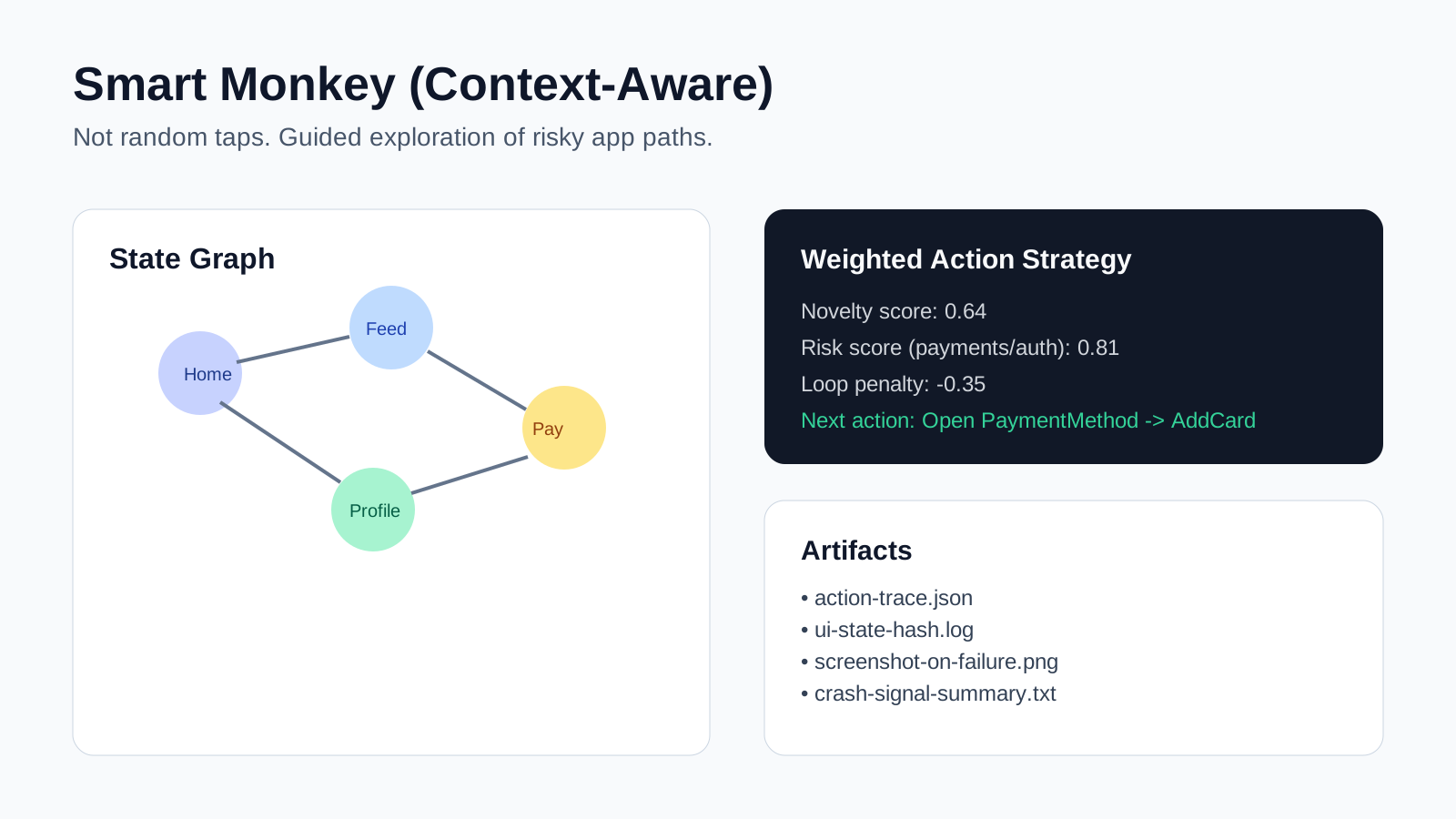
Traditional monkey testing is random. Smart Monkey keeps the exploration dynamic, but adds context.
What it does:
- understands basic UI structure and navigation patterns,
- avoids obvious dead ends,
- targets critical flows (e.g., auth, payments, profile),
- records artifacts and crash signals during runs.
Why it matters:
- better defect discovery than pure randomness,
- improved reproducibility of unstable paths,
- stronger confidence in app stability under unpredictable usage.
Technical analysis:
- Instead of random tap generation, the runner builds a live interaction graph:
- nodes = UI states/screens,
- edges = actions causing transitions.
- Action selection is weighted by heuristics:
- novelty score (prefer unseen states),
- risk score (prioritize sensitive flows),
- flakiness score (revisit historically unstable transitions).
- State hashing prevents loops and increases coverage efficiency.
- Every action is logged with timestamp + UI context, enabling deterministic replay of crash paths.
- Crash detection combines:
- process/appium session status,
- runtime errors,
- optional Sentry/logcat signals.
- This architecture raises bug yield per test minute compared with naive monkey runs.
5. API Contract Validator with Intelligent Validation
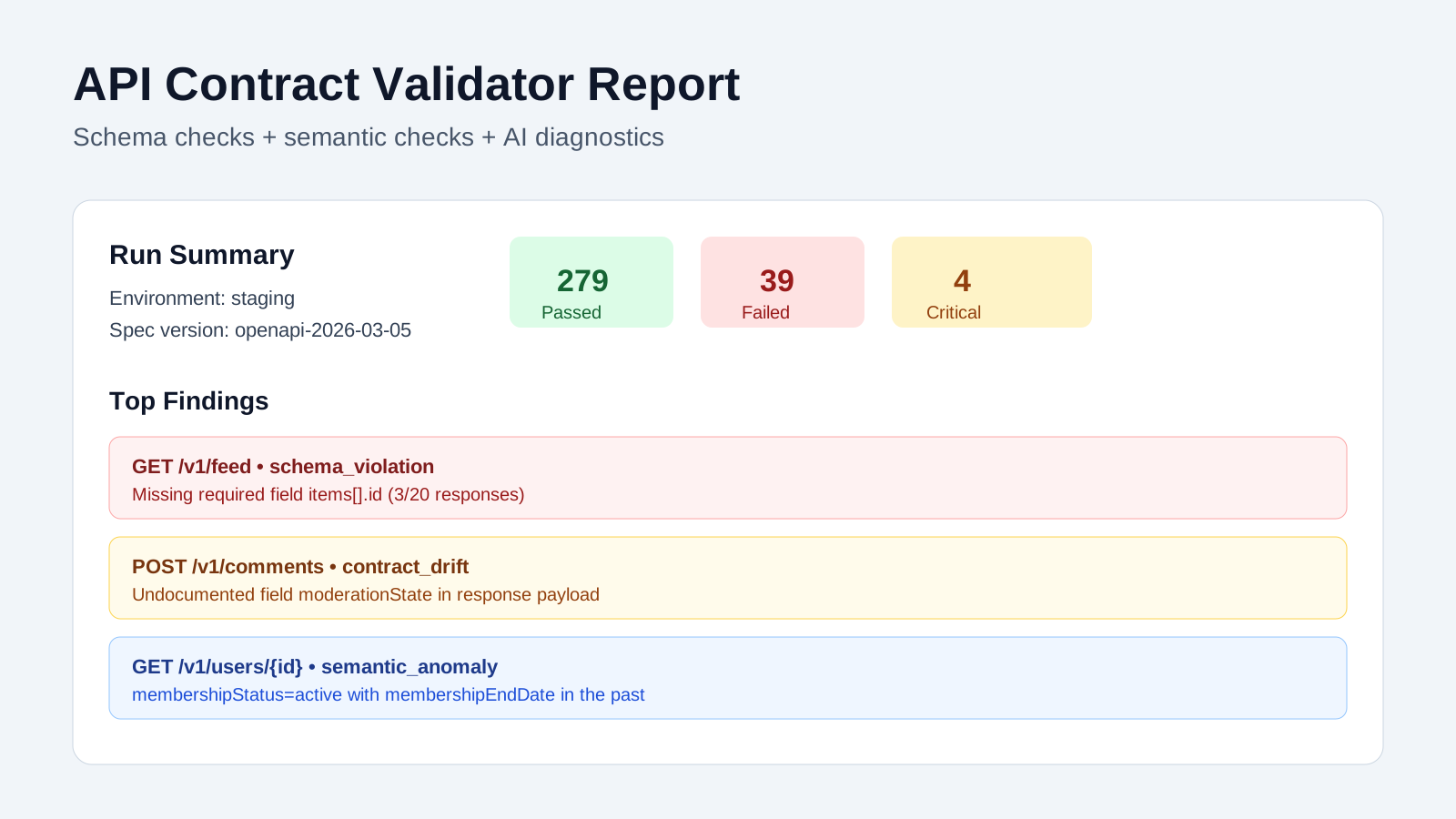
A 200 OK response does not guarantee correctness. AI-enhanced contract validation helps detect issues that basic checks miss.
What it does:
- validates payloads against API contracts,
- catches missing fields and type mismatches,
- detects unexpected nulls,
- highlights drift between docs and implementation,
- surfaces business-level inconsistencies in responses.
Why it matters:
- earlier detection of integration regressions,
- clearer ownership of failures (contract vs implementation vs data),
- faster feedback loop between QA and backend teams.
Technical analysis:
- Layer 1: schema validation against OpenAPI/JSON Schema:
- required fields,
- enum constraints,
- type/nullability rules,
- additional property policies.
- Layer 2: semantic assertions:
- pagination coherence (total, pageSize, returned items),
- cross-field consistency (status/date/state relations),
- backward compatibility expectations for existing clients.
- Layer 3: AI diagnostics:
- classify failures (schema_violation, contract_drift, semantic_anomaly),
- produce human-readable probable cause and impact summary.
- At the end of the run, a contract validation report is generated so QA and backend teams can triage by severity and endpoint instead of reading raw assertion logs.
Example report (short format):
API Contract Validation Report
Environment: staging
Build: backend-2026.03.06.4
Spec version: openapi-2026-03-05
Date: 2026-03-06
Summary
- Endpoints tested: 42
- Requests executed: 318
- Passed: 279
- Failed: 39
- Critical: 4
- High: 11
- Medium: 17
- Low: 7
Failure Breakdown
- schema_violation: 18
- contract_drift: 9
- semantic_anomaly: 10
- backward_compatibility_risk: 2
Top Findings
1) [Critical] GET /v1/feed
Type: schema_violation
Issue: required field "items[].id" missing in 3/20 responses
Impact: mobile client cache key generation may fail
Probable cause: partial DTO mapping in feed serializer
2) [High] POST /v1/comments
Type: contract_drift
Issue: response includes undocumented field "moderationState"
Impact: spec and implementation out of sync
Probable cause: backend field added without OpenAPI update
3) [High] GET /v1/users/{id}
Type: semantic_anomaly
Issue: "membershipStatus=active" with "membershipEndDate" in the past
Impact: inconsistent business state returned to clients
Probable cause: stale read model or missing status recomputation
Regression Notes
- New failures since previous run: 12
- Resolved since previous run: 7
- Repeated failures (>3 runs): 5
Ownership
- Feed domain: 14 findings
- User domain: 9 findings
- Comments domain: 6 findings
- Platform/shared: 10 findings
Final Takeaway
AI agents do not replace QA engineers. They upgrade QA impact.
The strongest pattern is not “fully autonomous testing,” but practical augmentation:
- less repetitive manual work,
- faster root-cause investigation,
- better quality signals across UI, crashes, analytics, and APIs.
If your team already has test automation and observability in place, you likely have everything needed to start. Begin with one workflow where triage is slow or noisy, then scale from there

Related articles
Supporting companies in becoming category leaders. We deliver full-cycle solutions for businesses of all sizes.
